Tools
There are additional tools in flowchem to help users create the configuration file and utilize the API server.
Flowchem-qt
flowchem-qt is a desktop application that provides a graphical interface for managing the FlowChem server. It bundles four main features into a single window:
Config editor — load, edit, and save the
config.tomlfile without leaving the app.Server control — start and stop the FlowChem server, choose the bind address, and open the interactive API browser.
Autodiscover — run
flowchem-autodiscoverand stream the output directly into the config editor.Logs — live log viewer that streams server output in real time.
The application can also run in the system tray, keeping the server alive in the background when the main window is closed.
Install it with:
pip install flowchem-qt
Then launch with:
flowchem-qt
For a full description of all controls and options, see the flowchem-qt README.
Autodiscover
Some devices implemented in flowchem can be discovered using the autodiscover function present in flowchem. To activate this function, simply type the command in the command window.
flowchem-autodiscover
Autodiscover will examine the local network using Zeroconf service discovery to verify if there are any devices connected through Ethernet. Additionally, it will search for devices connected through serial connections based on the user’s preferences.
Warning
The autodiscover include modules that involve communication over serial ports. These modules are not guaranteed to be safe. Unsupported devices could be placed in an unsafe state as result of the discovery process!
After the examination, a configuration file will be generated with the main characteristics of each identified device.
This feature saves time when creating the configuration file. The file named flowchem_config.toml created is placed
in the flowchem package folder
Note
Some additional information is generally still necessary even for auto-detected devices.
Complete the missing information (if any) in this file, and then you will be ready to use flowchem!
Note
flowchem_config.toml is written in TOML format,
the syntax of this language is intuitive and designed to be human-editable.
If you follow this guide you will not need to learn anything about the TOML syntax, but you can just copy and modify the
examples provided.
Note
Not all the devices supported by flowchem can be auto discovered, so you might need to edit the configuration file manually for some device types.
Accessing API
This function searches for flowchem devices on the network and returns a dictionary where the keys are device names and values are API devices instances.
from flowchem.client.client import get_all_flowchem_devices

devices = get_all_flowchem_devices()
This variable devices can be referred to as “client,” as it is a client built on top of flowchem that utilizes its
functionalities.
In a similar way that you can access the functionalities of the devices through the API, you can use the client devices. For example, if you have an Elite11 pump, called pumpG, running on flowchem, you can send an infuse command to the pump with a volume of 10 ml and a flow rate of 1 ml/min through the API in the browser.

With the client devices, this can be done in Python. Using the client devices, the construction of protocols directly
in Python is facilitated.
from flowchem.client.client import get_all_flowchem_devices

devices = get_all_flowchem_devices()

devices["PumpG"]["pump"].put("infuse", {"volume": "10 ml", "rate": "1 ml/min"})
The example shown in section example presents one way of how the protocols can be constructed.
Direct approach
To efficiently discover devices exposed by a FlowChem server—especially when dealing with a large number of devices or multiple servers on the intranet—we recommend using the direct approach. In this approach, the user manually provides the IP address (or URL) of the desired server.
This address can be obtained from the FastAPI web interface (see illustration below).
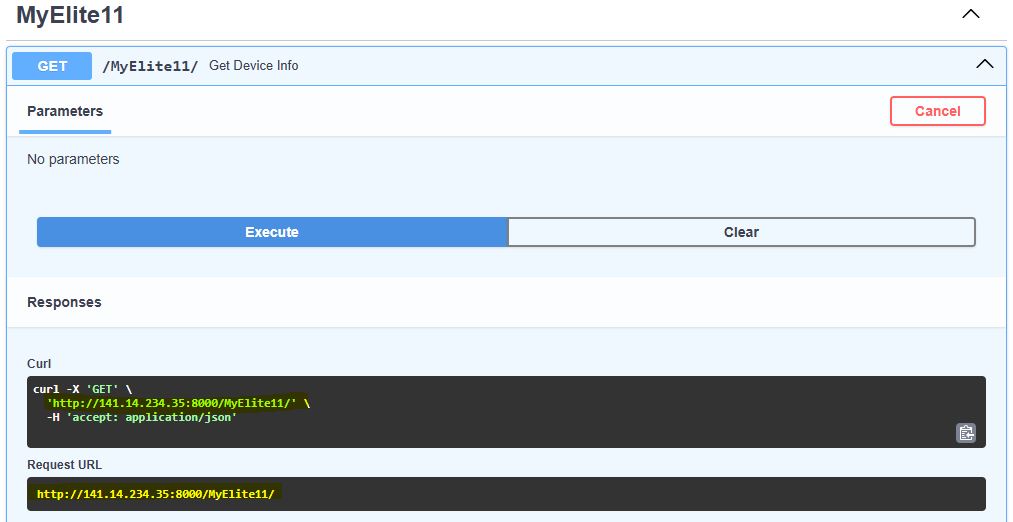 Figure: Accessing the server URL via FastAPI interface
Once the address is known, the function below (get_flowchem_devices_from_url) can be used to create clients for each available device on the server:
from flowchem.client.client import get_flowchem_devices_from_url

devices = get_flowchem_devices_from_url(url="http://141.14.234.35:8000/")

devices["PumpG"]["pump"].put("infuse", {"volume": "10 ml", "rate": "1 ml/min"})
This function queries the OpenAPI specification exposed by the server and returns a dictionary of initialized FlowchemDeviceClient instances, each corresponding to one device.